
AI Fashion Content Guide
MCP Server for Fashion Content Generation
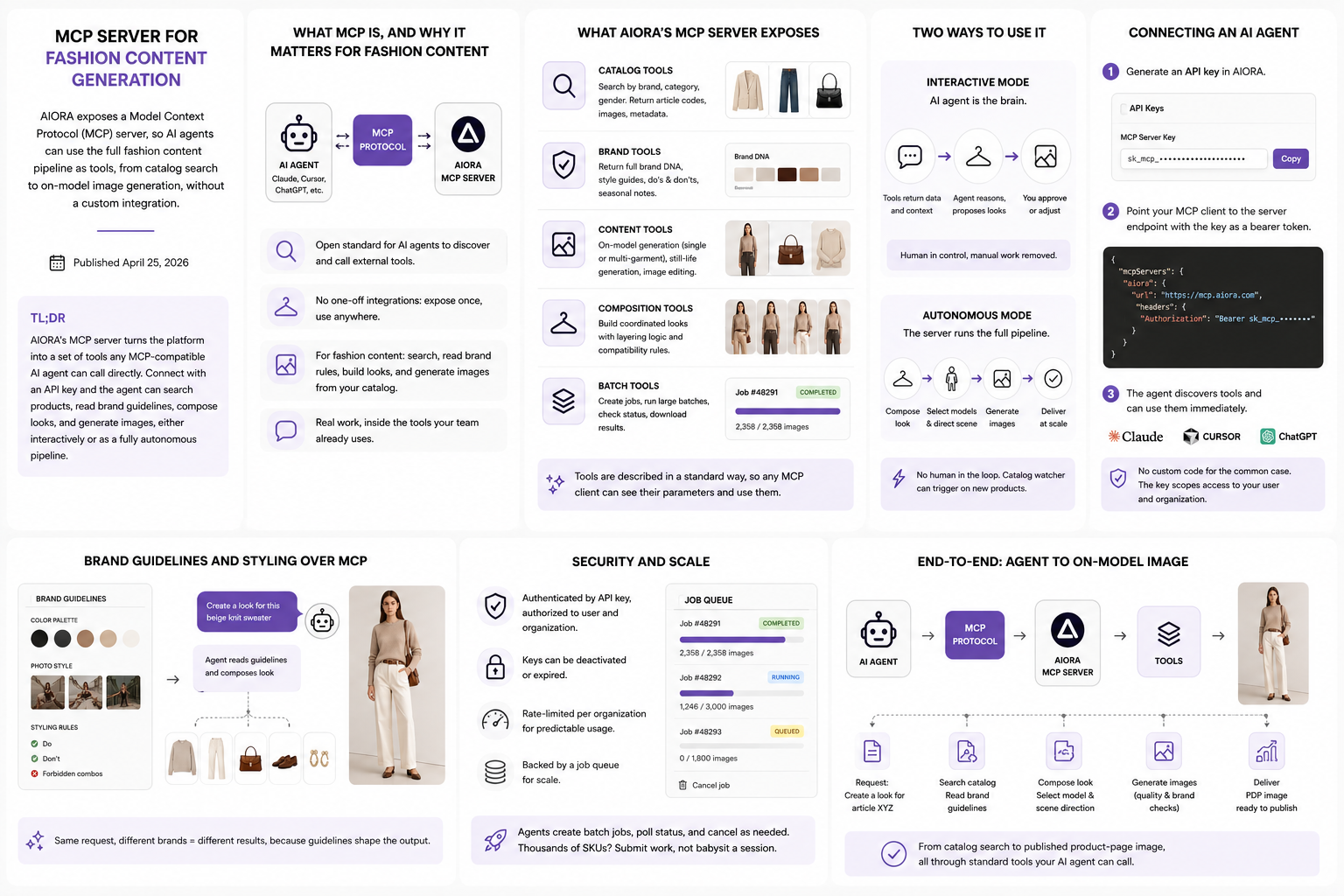
AIORA exposes a Model Context Protocol (MCP) server, so AI agents can use the full fashion content pipeline as tools, from catalog search to on-model image generation, without a custom integration.
TL;DR
AIORA's MCP server turns the platform into a set of tools any MCP-compatible AI agent (Claude, Cursor, ChatGPT, and others) can call directly. Connect with an API key and the agent can search products, read brand guidelines, compose looks, and generate images, either interactively or as a fully autonomous pipeline.
What MCP is, and why it matters for fashion content
Model Context Protocol (MCP) is an open standard that lets AI agents discover and call external tools in a consistent way. Instead of building a one-off integration for each AI app, you expose a server once and any MCP-compatible client can use it.
For fashion content, this means an AI assistant can do real work against your catalog: find products, read your brand rules, build a look, and generate the product-page image, all from inside the chat or editor the team already uses.
What AIORA's MCP server exposes
The server publishes the platform's capabilities as discrete tools. Catalog tools search products by brand, category, and gender and return article codes, images, and metadata. Brand tools return the full brand DNA and styling guidelines.
Content tools handle the actual production: on-model generation (single or multi-garment), still-life generation, and natural-language image editing. Composition tools build coordinated looks, and batch tools run large jobs and report their status.
Because the tools are described in a standard way, the connected agent sees them automatically, with their parameters, and decides which to call for a given request.
Two ways to use it: interactive and autonomous
In interactive mode the AI agent is the brain. Tools return data and context, the agent reasons over them and proposes looks, and you approve or adjust before images are generated. This keeps a human in control while removing manual catalog and production work.
In autonomous mode the server runs the full pipeline itself: look composition, styling direction, model selection, scene direction, and batch image generation, with no human in the loop. A catalog watcher can even trigger this automatically when new products appear.
Connecting an AI agent
Connection is an API key. You generate a key in AIORA, then point an MCP-compatible client at the server endpoint with the key as a bearer token. Clients like Claude Desktop and Cursor connect to remote MCP servers natively.
No custom code is required for the common case: once the client is configured, the agent can immediately call AIORA's tools. The same API key scopes access to your user and organization, so the agent only sees your catalog and brands.
Brand guidelines and styling over MCP
The styling logic and brand guidelines that drive look creation are available through the server, not just inside the app. When an agent composes a look, it can read the brand's palette, photo style, tone, and styling rules, including forbidden combinations and seasonal notes.
This is what keeps agent-generated content on-brand. The same request produces different results for different brands because the guidelines, not just the prompt, shape the output.
Security and scale
Every request is authenticated by API key and authorized to a specific user and organization, and keys can be deactivated or expired. Requests are rate-limited per organization to keep usage predictable.
For volume, the server backs generation with a job queue: agents create batch jobs, poll their status, and cancel them as needed, so producing content for thousands of SKUs is a matter of submitting work rather than babysitting a session.
Frequently Asked Questions
An MCP (Model Context Protocol) server exposes tools that AI agents can discover and call using an open standard. AIORA's MCP server exposes its fashion content pipeline so AI agents can search catalogs, compose looks, and generate images directly.
Any MCP-compatible client can connect, including Claude, Cursor, and ChatGPT, plus other AI tools that support the protocol. They discover AIORA's tools automatically once connected.
No. For the common case you generate an API key and configure an MCP-compatible client to point at the server endpoint with that key. The agent can then call AIORA's tools without custom integration code.
Yes. Beyond interactive use, the server can run an autonomous pipeline (look composition, styling, model selection, scene direction, and batch generation) and can auto-trigger it when new products appear in the catalog.
Each request is authenticated by API key and scoped to a specific user and organization. Keys can be deactivated or expired, and requests are rate-limited per organization.
Turn one product photo into complete fashion content
AIORA generates on-model photography, still-life images, video, and product copy from one input image.